
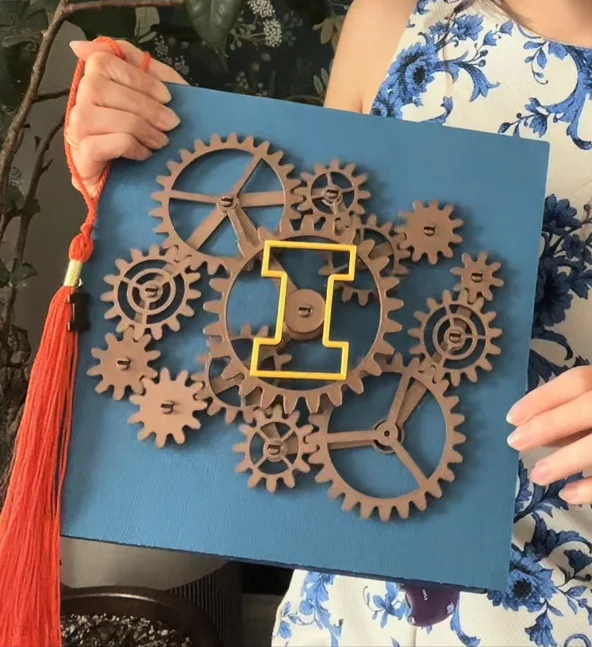
One of the most recognizable aspects of graduation season is the way people customize their caps. A mortarboard has become a small canvas for sharing something personal. It might feature a single sentence, a joke, or a “Thank you, Mom and Dad!” It’s a tiny expression of someone’s personality squeezed into a 9-inch square.
Creating a Cap for Engineering Students
Christina Ernst, the creator of She Builds Robots, specializes in building wearable projects that combine mechanical design, fabric, circuits, and coding. Although she has already graduated, she wanted to create something for current engineering students that they could download, customize, and use to build their own graduation caps.
She started with a system that engineers are very familiar with: gears. Gears are among the first mechanisms studied by many engineering students. They show how motion is transferred and how different parts interact, making them a representation of the thinking behind an engineering degree.
A tradition that keeps changing
The graduation cap originated in the 12th and 13th centuries at medieval universities in Europe. It evolved from the ecclesiastical pileus and biretta caps worn by clergy and scholars. Over time, these caps became standard academic dress and eventually became part of graduation ceremonies across the United States. The modern name “mortarboard” comes from the square board used by bricklayers, as the graduation cap resembles this tool.
Customizing graduation caps is a relatively new trend. Originally, it started as a way to make a statement, but it has evolved into a means for graduates to showcase their personal experiences, values, and future aspirations. If you are completing your engineering degree, this is also a great opportunity to create and share something unique.
A moving gear graduation cap
Christina designed the cap with a set of interlocking gears positioned directly on its surface. She wanted to keep the gears exposed and in motion, transforming the cap into a small mechanical system. The movement of the gears demonstrates how the parts interconnect and respond to one another, mirroring the operation of a basic gear train.
Improving gear design with CAD
In her previous wearable projects, Christina would often place gears wherever they fit and make adjustments during assembly. This time, however, she researched the relationship between gear teeth, diameter, and module. Using SOLIDWORKS for Makers, she carefully planned the exact positions for each gear to snap into place. Refining her design with CAD significantly improved how the entire project came together. The structure was stable, and the gears aligned and spun correctly during the first assembly.
Building the final graduation cap
The gears were 3D-printed using a bronze-colored filament, giving them a more mechanical look. This filament is a standard PLA blend that produces a dull metallic finish, making movement more visible. The centered layout of the gears ensures that the system remains balanced.

To read the full article, click here.
Click here to learn more, get a quote, or contact an expert at The SolidExperts.
Want to learn more and take a deep dive into SOLIDWORKS? Check out our upcoming training classes to enhance your SOLIDWORKS skills. All classes are offered in person and virtually.



SUBMIT YOUR COMMENT