
Growing up, I loved cars. As early as I can remember, I was sketching cars. While studying mechanical design in college, I got the chance to design electric all-terrain vehicles (ATVs) and race them for the student motor sports team. In racing, speed was everything.
When it comes to design, I understand your need for speed and would like to introduce you to a new package that will increase your productivity. As a product manager for SOLIDWORKS, I get to help roll out our new products. I am happy to announce that as of July 2025, SOLIDWORKS xDesign is available as a single product, combining all your favorite capabilities, such as parametric part and assembly design, subdivision modeling, sheet metal, frame design, mold tools, drawings, MBD, and rendering — all under one convenient interface. These capabilities, which were previously available as separate a-la-carte roles, are now brought together for a seamless experience. Because it’s browser-based and runs on the 3DEXPERIENCE platform, you can design and collaborate from anywhere, on any device, using only a web browser — while connecting and keeping track of communication about your models without ever leaving the software.
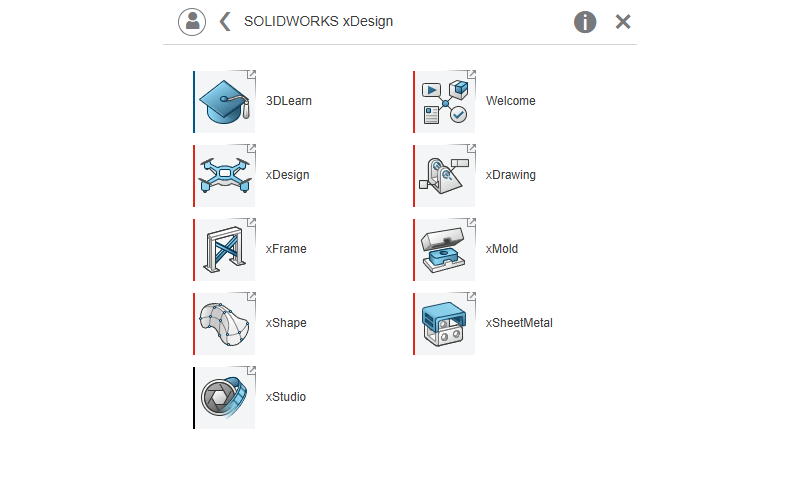
In this blog, I’ll cover what’s included, key capabilities, and the latest functionality.
Key capabilities include:
Parametric Design
- Easily model parametric solids and surfaces to convey conceptual design and detailed parts and assemblies.
- Design for manufacturability checks to reduce the time and cost of production.
- AI-assisted workflows and design guidance to accelerate design intent and product development.
Freeform Design
- Create complex surfaces quickly using intuitive push-pull interaction.
- Use images and sketches as a guide to create 3D surface geometry.
- Seamlessly switch between conceptual modeling and detailed modeling environments and eliminate the need for rework.
Sheet Metal Design
- Create complex 3D sheet metal geometry and automatically generate and view 2D flat pattern geometry.
- Review and prepare accurate 2D flat patterns for manufacturing that always stay up to date with the folded geometry.
- Easily design sheet metal assemblies and enclosures around existing mechanical or electrical geometry.
Structure Design
- Create structure members based on model edges, 2D sketch elements or curves.
- Rapidly perform trim operations at corners and end points to create precise, manufacturable designs.
- Automatically generate a cut list based on the design to use for fabrication.
2D Drawings and MBD
- Convey design requirements and specifications directly on your model, reducing discrepancies and ensuring an always up-to-date connection between definition and engineering.
- Quickly and intuitively define design requirements in 3D.
- Easily produce an accurate 2D representation from your existing 3D definitions in just a few clicks.
Mold Design
- Automatically create parting lines, shutoff surfaces, parting surfaces, and mold splitting, making mold design faster.
- Eliminate mold lockup and ensure proper mold function with draft and undercut checking.
- Output mold core, cavity, and insert components quickly and easily for manufacturing and 3D printing.
Product Rendering
- Apply or create different environments, including light sources and backgrounds, to influence the model’s appearance and reflections.
- Assign and adjust material properties, controlling characteristics such as color, reflection, and opacity to create realistic surface appearances.
- Define unique scenes with different camera angles and zoom levels for various visual representations of the same product.
In addition to the above functionality, you can easily store, manage and collaborate on your data in the cloud.
That is just a glimpse of what xDesign has to offer. We introduce enhancements throughout the year in the functional deliveries.
Here’s a handful of cool tools introduced this year:
Extender Reality (XR)
Get a better understanding of how your models will fit in the real world with the new Extender Reality (XR) environment, which enables you to visualize your product in a virtual or real world with virtual reality (VR) and augmented reality (AR) settings.
Generative Drawing Views
Use the power of artificial intelligence (AI) to eliminate repetitive drawing tasks with generative view creation and placement. In the new Sheet command, there’s a new option called Generate Drawing Views (Beta).
Generative hole callout
Using AI, hole callouts are automatically generated using actual geometry, so you can create a hole callout for any cylindrical shape. The software will look at the geometry to determine if it’s a simple hole, or counter hole, for example, and then automatically create a hole callout.
2D Authoring for Section and Detail Views
Easily create section and detail views from the drawing environment using familiar workflows with section lines and crop circles.
Feedback button
A new feedback button allows you to share your thoughts on xDesign and submit enhancement ideas directly to the xDesign R&D team.
Do you want to learn more about the capabilities? Open the 3DLearn app to access all the learning content.
SOLIDWORKS xDesign is CAD reimagined for the next era. People are transforming the way they work, and their tools must evolve to keep pace. Whether you’re a professional designer, student, or maker, xDesign offers a broad range of capabilities and a flexible way to use them. With all apps in one single convenient location, users can benefit from enhanced workflows and a simplified user interface. Since xDesign is browser-based, there’s no software installation, and you can get up and running fast. Not to mention, this all-in-one offering is a great deal.
To read the full article, click here.
Click here to learn more, get a quote, or contact an expert at The SolidExperts.
Want to learn more and take a deep dive into SOLIDWORKS? Check out our upcoming training classes to enhance your SOLIDWORKS skills. All classes are offered in person and virtually.



SUBMIT YOUR COMMENT